

Agisoft Metashape represents a state-of-the-art software tool designed for processing images and extracting valuable spatial data. The platform is constantly evolving to incorporate the latest breakthroughs in photogrammetry. It supports data captured from RGB and multispectral cameras, including setups with multiple cameras, to generate high-quality spatial outputs. These include photogrammetric point clouds, textured 3D polygonal models, georeferenced true orthomosaics, and digital surface models (DSMs) or digital terrain models (DTMs). By combining image data with LiDAR point clouds, users can harness the unique strengths of each data type to achieve superior results. Additionally, advanced postprocessing features allow the removal of shadows and texture flaws, the calculation of vegetation indices, and the creation of actionable maps for agricultural equipment. Automated classification of dense point clouds is also supported, ensuring efficient data handling.
Rapid Processing with High PrecisionAgisoft Metashape leverages cutting-edge technologies developed by Agisoft to deliver exceptionally fast processing speeds. Despite its efficiency, the software maintains consistently high levels of accuracy, making it suitable for both aerial and close-range photography. Users can achieve resolutions as fine as 3 cm for aerial projects and up to 1 mm for close-range applications. Furthermore, the integration of LiDAR data enhances surface reconstruction, providing unparalleled detail and precision.
Flexible Processing Options: Local or Cloud-BasedWith distributed processing capabilities, Metashape can handle projects involving over 50,000 photos across a local computing cluster. Alternatively, users can opt for cloud-based processing, which reduces the need for extensive hardware investments. Regardless of the chosen method, all processing functionalities remain accessible, providing flexibility for different project requirements.
User-Friendly Interface and Advanced FeaturesMetashape’s intuitive, project-based workflow is designed to be easily navigable, even for those new to photogrammetry. At the same time, experienced professionals can take advantage of advanced features such as stereo mode to refine outputs and exercise full control over accuracy. Upon project completion, the software generates comprehensive reports, ensuring transparency and precision in the results.
By integrating innovative photogrammetry techniques with the power of LiDAR data, Agisoft Metashape stands out as a versatile and robust tool for professionals in fields such as geospatial analysis, urban planning, and agriculture.
Agisoft Metashape Applications:- Surveying
- Mapping
- Mining
- Quarrying
- Agriculture
- Underwater
- Archaeology
- Architecture
- UAV/ drone inspections
- Forensics
- Biology
- Interior
- Medicine
- Game Design
- Combined processing of imagery, terrestrial laser scans and aerial LiDAR data
- Highly accurate and detailed results
- GPU acceleration for faster processing
- Agisoft Cloud for processing, visualization and sharing of the results
- Easy sharing with PDF or fly through video export and direct upload to online resources
- Block models for editing of city-scale models
- Fully automated and intuitive workflow
- Network processing for large projects
- Stereoscopic measurements for precise feature extraction
- Reasonably powerful Standard edition for art projects
- Satellite, aerial and close-range triangulation
- Incremental image alignment
- Combined alignment of imagery and terrestrial laser scanner data
- Geometric registration of TLS point clouds
- DSM/DTM generation
- Coded and non-coded targets auto detection
- Georeferencing using flight log and/or GCPs
- Image set redundancy analysis
- Photogrammetric point cloud generation
- Marker-based point clouds (photogrammetric, TLS, aerial LiDAR) registration in one coordinate system
- Automatic classification of photogrammetric and LiDAR point clouds
- DEM editing tools
- True orthomosaic generation in geographic and user defined projections
- Manual orthomosaic seamline editing
- Coordinate/distance/area/volume/profile
- Automatic powerlines detection measurements
- Automatic seamline refinement for traditional DTM-based orthomosaics
- Coordinate/distance/area/volume/profile
- Automatic powerlines detection measurements
- Vegetation index calculation for multispectral imagery projects
- Prescription maps generation and export
- Polygonal model reconstruction, including block models
- Texture generation with delighting filter
- Deghosting filters for texture and orthomosaic
- Ambient occlusion, normal and displacement maps generation
- Hierarchical tiled model generation and visualization
- Mission planning for complex sites
- 4D reconstruction for dynamic scenes
- Spherical panorama stitching
- Python scripting and Java API for job automation
- Headless operation support
- Batch processing for multi-task pipelines automation
- Free stand-alone Agisoft Viewer for responsive visualization of large models
 Terrestrial laser scanner data registration
Metashape 2.1 allows to automatically register LiDAR point clouds based on local geometry features without using color information that can be missing or inaccurate. LiDAR point clouds can also be aligned with images using combination of 3D and 2D tie points in the adjustment process, provided that color information is present. In case external registration data is available, initial point cloud positions can be fixed and preserved during alignment.
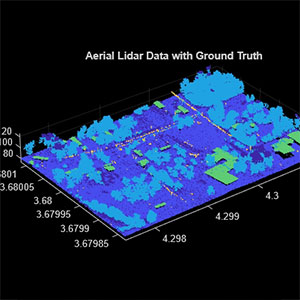 Aerial LiDAR data denoising and splitting
Metashape 2.1 includes a new point cloud smoothing tool that allows to automatically reduce noise in the LiDAR data collected using low-cost LiDAR systems. Point cloud smoothing tool can be applied to selected area of the LiDAR point cloud or to specific point classes.
When trajectory data is available, Metashape 2.1 allows to split point cloud into adjacent strips according to the user specified criteria, like range of heading or altitude change. Selected trajectory segments can be further edited by the user or filtered out if necessary.
 Block models for city-scale projects
Metashape 2.1 introduces block models concept. This approach to 3D model generation allows to create polygonal model of a large area in parts. Individual model blocks can be easily edited in Metashape or external software thanks to their moderate size. Metashape enables to re-texture edited blocks taking into account geometry changes. Blocks can be cut according to user-defined grid, which allows to easily merge multiple overlapping datasets into one seamless model. Metashape supports export of edited block models in Cesium 3D Tiles or Esri SLPK formats that can be published online or within enterprise infrastructure.
 Advanced tools for inspection, annotation and measurement in Agisoft Cloud
Agisoft Cloud platform has expanded its capabilities for visual inspection and change monitoring. Users can now utilize a dedicated tool to navigate images within the 3D scene, annotate points of interest, and generate inspection reports. Newly-released version of the platform introduces tools to compare elevation profiles and measure surface volumes with improved efficiency.
Agisoft Cloud now supports upload of vector maps in various common formats and offers enhanced annotation styling options for better customization.

Photogrammetric triangulation
- Image processing of multiple kinds: aerial (nadir, oblique), close-range, satellite, drone imagery.
- Auto-calibration: frame (including fisheye lenses), spherical & cylindrical cameras.
- Supports data & imagery from different types of cameras in the same project.
- Enables processing of images containing fiducial marks for alignment.

Dense point cloud: edition and classification
- Elaborate model editing for ultra-precise results.
- Automatic multi-class point classification to customize further reconstruction.
- Import/export to benefit from classical point data processing workflow.

Digital elevation model: DSM/DTM generation and editing
- Digital surface and/or digital terrain model — according to the project.
- Geotagging based on EXIF meta data/flight log, GCPs data.
- EPSG registry coordinate systems support: WGS84, UTM, etc.
- Configurable vertical datums based on the geoid undulation grids.
- DEM editing: breaklines drawing, fill tools.

Georeferenced orthomosaic generation
- Georeferenced orthomosaic: most-GIS-compatible GeoTIFF format; KML files to be located on Google Earth.
- Export in blocks/tiles for very large projects.
- Color correction for homogeneous texture.
- Inbuilt ghosting filter to combat artifacts due to moving objects.
- Custom planar and cylindrical projection options for close range projects.

Supports data from LiDAR
- Aerial LiDAR point attributes support.
- External registration support for laser scans.
- Marker-based alignment of laser scans.
- Laser scans visualization in Model view.
- Ground points classification adapted for LiDAR data.

Ground control points / scale bar support
- GCPs import for georeferencing and control over the accuracy of the results.
- Coded/non-coded targets auto-detection for fast GCPs input.
- Set reference distances conveniently with the scale bar tool, eliminating the need for positioning equipment.

Measurements: distances, areas, volumes
- Integrated tools allow precise measurements of distances, areas and volumes.
- For advanced metric analysis, photogrammetric outputs can be seamlessly exported to external software using a wide range of supported formats.

Stereoscopic measurements
- Compatible with advanced 3D monitors and 3D controllers, ensuring accurate stereoscopic feature mapping and measurements.

3D model generation and texturing
- Multiple types of sites and displays: archaeological sites, artifacts, buildings, interiors, people, objects, etc.
- Direct upload to various online resources and export to many popular formats.
- Photorealistic textures: HDR and multifile support (incl. UDIM layout).

Hierarchical tiled model generation
- City scale modeling preserving the original image resolution for texturing.
- Cesium publishing.

4D modeling for dynamic scenes
- Multi camera rig data processing for creative projects in cinematographic art, game industry, etc.
- Basis for numerous visual effects with 3D models reconstructed in time sequence.

Panorama stitching
- 3D reconstruction for data captured from the same camera position — camera station, provided that at least 2 camera stations are present.
- 360° panorama stitching for one camera station data.

Multispectral imagery processing
- RGB/NIR/thermal/multispectral imagery processing.
- Fast reconstruction based on preferable channel.
- Multichannel orthomosaic generation and user-defined vegetation indices (e.g. NDVI) calculation and export.

Automatic powerlines detection
- Straightforward and time-efficient for large-scale projects since requires only aligned images as the input.
- Results export in a form of a 3D polyline model for every wire.
- Robust results thanks to catenary curve fitting algorithm.

Satellite imagery processing
- Common processing workflow for panchromatic and multispectral satellite images is supported, provided that sufficiently accurate RPC data is available for each image.
Python and Java API
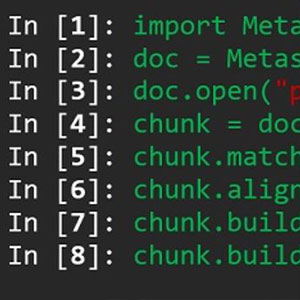
- In addition to Batch processing – a way to save on human intervention, Python scripting and Java bindings suggests for sophisticated automation and customization options. Starting from the adding custom processing operations to the application GUI up to the complete job automation and integration to Python or Java pipeline.

Network processing
- Distributed calculations over a local computer network to use combined power of multiple nodes for huge data sets processing in one project.

Cloud processing
- Cloud processing interface allows to save on the hardware infrastructure for photogrammetric pipeline, with further option to visualize and share the variety of the processing results online with colleagues or customers, as well as to embed published projects in your own web platforms.

Photogrammetric triangulation different types of imagery from multitudes of cameras.
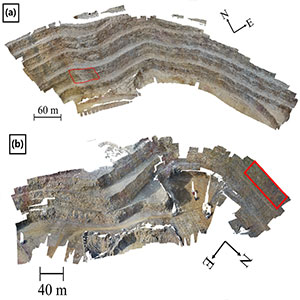
Generation of dense point clouds.

Production of 3D models and texturization of objects such as buildings, interiors, people, items, etc.

Panorama stitching and 3D reconstruction for multiple camera stations, plus 360° panoramas per station.